AA

Featured products

    Popular categories

      Trending searches

        Articles

          Blog

            Products

              Categories

                Suggested searches

                  Searching…
                  No results
                  Something went wrong.
                  ↑↓ Select↵ OpenEsc Close search
                  • English
                  • Čeština
                  • Deutsch
                  • Español
                  • Français
                  • Italiano
                  • Polski
                  • 日本語
                  • Orders
                  • Address
                  • In-stock Alerts
                  • My Courses
                  • Subscription
                  • Edit Account
                  • 3D printers9+▾

                    3D printersnew

                    newPrusa CORE One L+Learn more
                    newPrusa CORE One+ (Gen 2)Learn more
                    newPrusa CORE One L+ INDX 8-ToolnewPrusa CORE One+ (Gen 2) INDX 8-ToolPrusa CORE One L+: Critical InfrastructureOriginal Prusa MK4SnewOriginal Prusa XL+Original Prusa XL+: Critical Infrastructure

                    Printer upgrades

                    newINDX Conversion KitsnewPrusa CORE One L to CORE One L+ upgradenewPrusa CORE One+ to Prusa CORE One+ (Gen 2)newPrusa XL to Prusa XL+ Upgrade
                    Prusa Reward ProgramLove your Prusa printer? Share your experience and earn $30 Prusa e-shop vouchers.
                    How to Choose a 3D Printer?We’ll walk you through the basics to find the exact machine for your space, budget, and ideas.
                    Free E-bookDownload a free e-book Basics of 3D Printing with Josef Prusa and make your first steps in 3D printing world
                    Original Prusa Printable PartsCollections of printable spare parts for Original Prusa 3D printers and upgrades.
                    Shipping informationRegularly updated info about the current manufacturing capacity and delivery times of our printers.
                    Custom 3D PrintingProfessional custom 3D printing from various materials according to your requirements.
                  • Materials▾

                    Filaments

                    PrusamentPLAPETGASA / ABSPC (Polycarbonate)PA (Nylon)FlexCompositesSpecialMaterials clearance sale

                    Resin

                    Prusament ResinResin Cleaner
                    Filament GuideCheck my Prusament Spool
                    Prusament.com
                  • Parts & Accessories▾

                    Accessories

                    EnclosuresNozzlesPrint SheetsEssential AccessoriesCameras & AddonsTools & CraftingAdhesives

                    Spare parts

                    Merchandise

                    Spare parts - All PrintersCORE OneMK4/S & MK3.9/SMK3/S/+XL
                    Merch
                  • For Business▾
                    Prusa Pro HT90Prusa Pro SLXPrusa Pro AFSPrusa Pro Medical OneOriginal Prusa XLOriginal Prusa XL: Critical Infrastructure
                    Prusa CORE One+Learn more
                    Prusa CORE One LLearn more
                    Prusa CORE One L: Critical Infrastructure Edition

                    3D Printing for

                    Manufacturing and R&DAutomotive IndustryHealthcareEducation and Academic ResearchArchitects and DesignersFilm IndustryCritical Infrastructure

                    3D Printing Stories

                    • How 3D printing started: About Rep-rap and open-source with Adrian Bowyer
                    • Teaching mathematics redefined with 3D printing at JKU Linz
                    • The story behind the LTT screwdriver
                    • Victoria Hand Project: Changing Prosthetic Care with 3D Printing
                    Official Prusa Resellers
                    Sustainability
                    Prusa Education
                    Contact and Inquiry
                    Custom 3D Printing
                    ISO Certified
                  • Software▾
                    PrusaSlicer

                    PrusaSlicerPrusaSlicer

                    PrusaSlicer is an open-source, feature-rich, frequently updated tool that contains everything you need to export the perfect print files for your 3D printer.

                    WindowsMacOSLinux
                    Prusa Connect

                    Prusa Connect

                    Prusa Connect is a cloud service enabling remote control and monitoring of your 3D printers, offering secure data handling, easy setup, and support for managing multiple printers from anywhere.

                    Log in to Connect
                    Prusa.app

                    Prusa.app

                    Control your printer/s remotely from anywhere using the Prusa Connect technology behind. Prusa.app brings a new level of Prusa printer experience to Android and iOS phones.

                    Try it now!
                    Drivers & FirmwareDownload the latest firmware and drivers for your 3D printer.
                    PrusaSlicer Support
                    Prusa Connect Support
                  • 3D Models▾
                    3D PrintersArt & DesignHobby & MakersHouseholdTabletop MiniaturesToys & GamesPrintables Store

                    Popular 3D models

                    • Strong garden hose holder
                    • Prusa Spool Bot
                    • Build Tray — Modular Organizer for Assembly, Disassembly and Maintenance
                    • Broom Holder
                    • Octagon Fabric
                    • Prusa CORE One ? (Mimic Skin)

                    Design Contests

                    • Framework Laptop 12 Mainboard Re-Use9/1/2026 – 9/30/2026
                    • 🏆 Designer Challenge: Magic tricks!9/1/2026 – 9/22/2026
                    • Od prototypu k produktu: Příslušenství ke kamerám8/1/2026 – 9/14/2026
                  • Community▾

                    Upcoming Events

                    • Maker Faire Tokyo 20269/5/2026 – 9/6/2026 · Tokyo, Japan · Prusa Team
                    • IFA 20269/4/2026 – 9/8/2026 · Berlin, Germany · Prusa Team
                    • 3D Printopia 20269/26/2026 – 9/27/2026 · Pennsylvania, United States · Prusa Team
                    • Maker Faire Bay Area9/25/2026 – 9/27/2026 · Kalifornie, United States · Prusa Team

                    Prusa Forum

                    • [PrusaSlicer 3.0 Plugin] Filament Sample Card Generator
                    • Main-plate can't be removed (Filament stuck)
                    • Core One UI freeze
                    Prusa World MapPrusa World MapFind local 3D printing users and explore the community around you.
                  • Help▾
                    Guides & TutorialsPrusaSlicerPrusa ConnectMaterials

                    Printer Model

                    CORE One INDXCORE One LCORE One+CORE One

                    Hardware Troubleshooting

                    • Selftest failed (CORE One/+)
                    • Clogged nozzle (CORE One, CORE One L, XL, MK4/S, MK3.9/S)
                    • Adjusting belt tension (CORE One/+, CORE One INDX, CORE One L/+)
                    • Prusa Connect and PrusaLink explained

                    Drivers & Firmware

                    INDX familyCORE One familyMK4 familyXL familyMMU familyPRO family
                  • Courses▾

                    Become an expert in 3D printing

                    Prusa Academy offers online courses on various 3D printing related topics. Each course features:

                    • easy-to-read text with many pictures and short videos
                    • links for inspiration and further study
                    • quizzes for testing your knowledge along the way
                    • certificate of completion
                    Browse all coursesMy courses library
                    • 3D Modeling in Autodesk Fusion
                    • PrusaSlicer Masterclass – Beginner to Advanced
                    • Complete Guide to 3D Print Postprocessing, Painting, and Detailing
                    • Airbrush Your 3D Prints: From Basics to Advanced Tricks
                  • Blog▾
                    • Back-to-School 2026 Deals Are Here!
                    • PrusaSlicer 3.0 Preview – Built for the Future of 3D Printing
                    • Prusa CORE One+ (Gen 2) INDX, Shipping Has Started, Complete Printers Open for Orders
                    E-Book: Basics of 3D Printing
                  • Company▾

                    About Prusa Research

                    We are the largest maker of 3D printers in Europe and the United States.

                    Founded as a one-man startup in 2012 by Josef Prusa, a Czech hobbyist, maker, and inventor. In just 15 years, we've grown into a company of more than 1,200 people. Every month, we design, build, and ship over 10,000 innovative and secure 3D printers from our headquarters in Prague, Czech Republic, and Delaware, USA, to users in more than 160 countries.

                    Watch a video and find out how Prusa Research was born and what we achieved within only 10 years!

                    About UsTimelineSustainabilityOpen-source
                    About Us
                    Contact Us
                    Logo and Photos
                    ISO Certified
                  1. Support
                  2. Prusa CORE One L+
                  3. 3D models
                  4. Modeling with 3D printing in mind
                   

                  Contents

                  • Overhangs and support material
                  • Splitting the model into multiple parts
                  • Fillet vs chamfer
                  • How many sides does your cylinder/circle have?
                  • Thin walls and minimum feature size
                  • Tolerances
                  • Fine details and material consideration
                  • Iterations of your design
                  • Orientation on the print bed
                  • Make sure it is manifold/solid
                  • Multi-material printing and dual extruders
                  • Using PrusaSlicer for certain elements

                  Blog

                  • Back-to-School 2026 Deals Are Here!
                  • PrusaSlicer 3.0 Preview – Built for the Future of 3D Printing
                  • Prusa CORE One+ (Gen 2) INDX, Shipping Has Started, Complete Printers Open for Orders

                  Newsletter

                  Signup and get our monthly squeeze on updates, blog, printables and much more.

                  By clicking, you agree to receive our newsletter.

                  This site is protected by reCAPTCHA Enterprise and the Google Privacy Policy and Terms of Service apply.

                  Strong garden hose holder
                  E-shop
                  • 3D Printers
                  • Printer Upgrades
                  • Filaments
                  • Accessories
                  • Prusa Merchandise

                  © Prusa Research a.s.

                  Printables
                  • 3D Models
                  • Store
                  • Clubs
                  • 3D Design Contests
                  • Brands
                  Community
                  • World Map
                  • Forum
                  • User Groups
                  • Events
                  Help
                  • Prusa Help
                  • Prusa Academy
                  • 3D Printing Calculators
                  Software
                  • PrusaSlicer
                  • Prusa.app
                  • Prusa Connect
                  • Drivers and Software
                  Company
                  • About Us
                  • Blog
                  • Official Prusa Resellers
                  • Contact Us
                  • Certified for ISO 9001, ISO 14001, ISO 45001
                  • General Terms and Conditions
                  • General Terms and Conditions of Use of the PRUSA Websites
                  • Privacy Policy
                  • Information about cookies
                  • Customer Complaints Policy
                  • Status Page
                  • Do Not Sell or Share My Personal Information
                  • Supplemental Statements
                  • General Terms and Conditions
                  • General Terms and Conditions of Use of the PRUSA Websites
                  • Privacy Policy
                  • Information about cookies
                  • Customer Complaints Policy
                  • Status Page
                  • Do Not Sell or Share My Personal Information
                  • Supplemental Statements

                  © Prusa Research a.s.

                  JOSEF PRUSA®, PRUSA RESEARCH®, PRUSA POLYMERS®, PRUSA ORANGE®, PRUSA 3D ® AND PRUSAMENT® are registered trademarks of Prusa Development a.s. used by Prusa Research a.s. under licence from Prusa Development a.s.

                  Modeling with 3D printing in mind

                  Relevant for

                  CORE One family
                  SOFTWARE
                  MK4 family
                  XL family
                  MK3.9 family
                  +
                  1 comment
                  Article is also available in following languages
                  English
                  Čeština
                  Polski
                  Deutsch
                  Français
                  Español
                  Italiano
                  日本語

                  Modeling for 3D printing presents several interesting challenges. FFF (Fused Filament Fabrication), with its layer-by-layer manufacturing process, the orientation and geometry can greatly affect both the aesthetic and integrity of your finished print. Moreover, different 3D modeling software have different terms and methods for achieving different results, so we will go over some basic guidelines when modeling with 3D printing in mind.

                  For a small introduction to finding a 3D modeling program, see Creating your own 3D models. 
                  For a complete course on the topic, we offer a 3D Modeling in Autodesk Fusion in our Prusa Academy.

                  Overhangs and support material

                  The most important thing to keep in mind while modeling for 3D printing is the need for support material. 3D printers can’t print in mid-air, as each layer has to be laid on top of another one. When designing, keep this limitation in mind and try to avoid creating steep overhangs and extreme angles. That said, short horizontal bridges can be printed without supports.

                  A 3D printer can cleanly print overhanging structures with an angle between 45 and 60 degrees, depending on your nozzle diameter and settings.

                  Our FDM printer models with Nextruder and 360° cooling can print overhangs of up to 75° without supports. These models are the MK4S, the CORE One/+, and the CORE One L. 

                  The standard diameter for nozzles on desktop 3D printers is 0.4 mm. For smaller nozzles, like 0.25 mm, the angle might be less than 45 degrees. If you must have very steep overhangs or free-floating geometry in your design, consider if this will be visible in the final product, as surfaces above supports will not have the same finish as a side wall or a top fill. You can model in break-away supports, or split your part into multiple pieces (explained in the next section) for a better orientation.

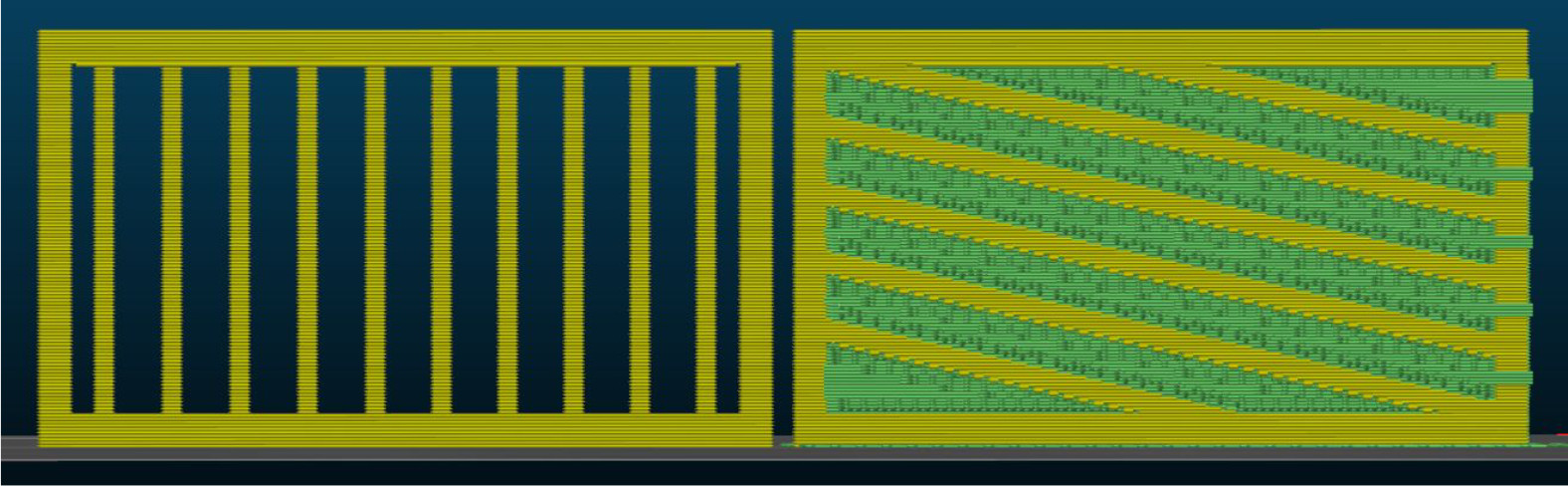
                  Let’s take a look at an example - you need to design a part of a fence, and it’s up to you how the pickets will look. In the pictures below, you can see two ways to design a fence if we want to print it in a vertical position. The best solution here will be to print the part horizontally.
                  Splitting the model into multiple parts

                  Both the visual and mechanical properties of your model can be improved by splitting it into multiple parts. This way, they can be optimized for better orientation and placement on the print platform. This way, you can minimize the number of supports required. The parts of the object can then be glued together. PrusaSlicer has a cut tool to make this easier. You can also use Meshmixer to cut the models.

                  When you glue the parts of your object together, make sure that the surfaces to be glued are smooth and free of grease or dirt, to achieve an invisible seam. The ironing feature in PrusaSlicer can also assist in this. Also, it can be helpful to lightly sand the surface to increase adhesion. The need for sanding will depend on geometry, surface finish, and the type of glue. Superglue can be very viscous, so it may not be ideal for rough surfaces. It can also leave traces of itself. When you find the right glue for your model and material, the seam should be stronger than the rest of the material, but you might want to model in some pegs for alignment and strength.
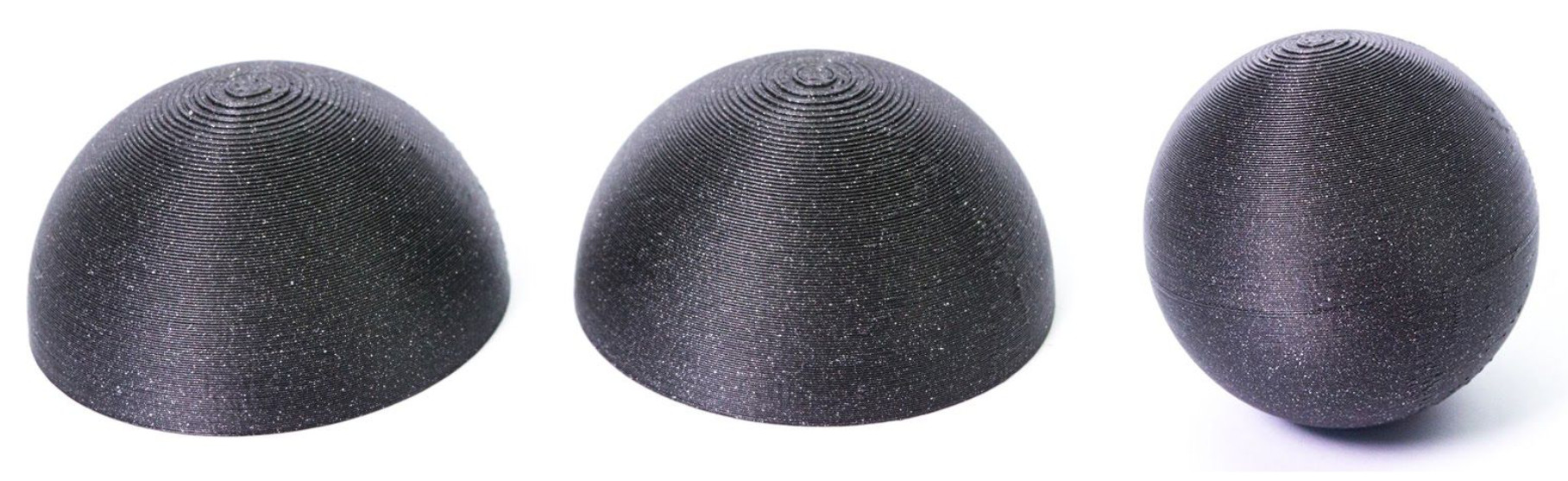
                  On smaller models, the seams from attaching parts together will be more visible than on bigger models.

                  Fillet vs chamfer

                  If oriented towards the print bed, fillets create a very steep overhang, which negatively affects the surface of the object. For this reason, ​use chamfer instead​ if a perfect part finish is a priority. However, you can improve on this using the Variable layer height function in PrusaSlicer.
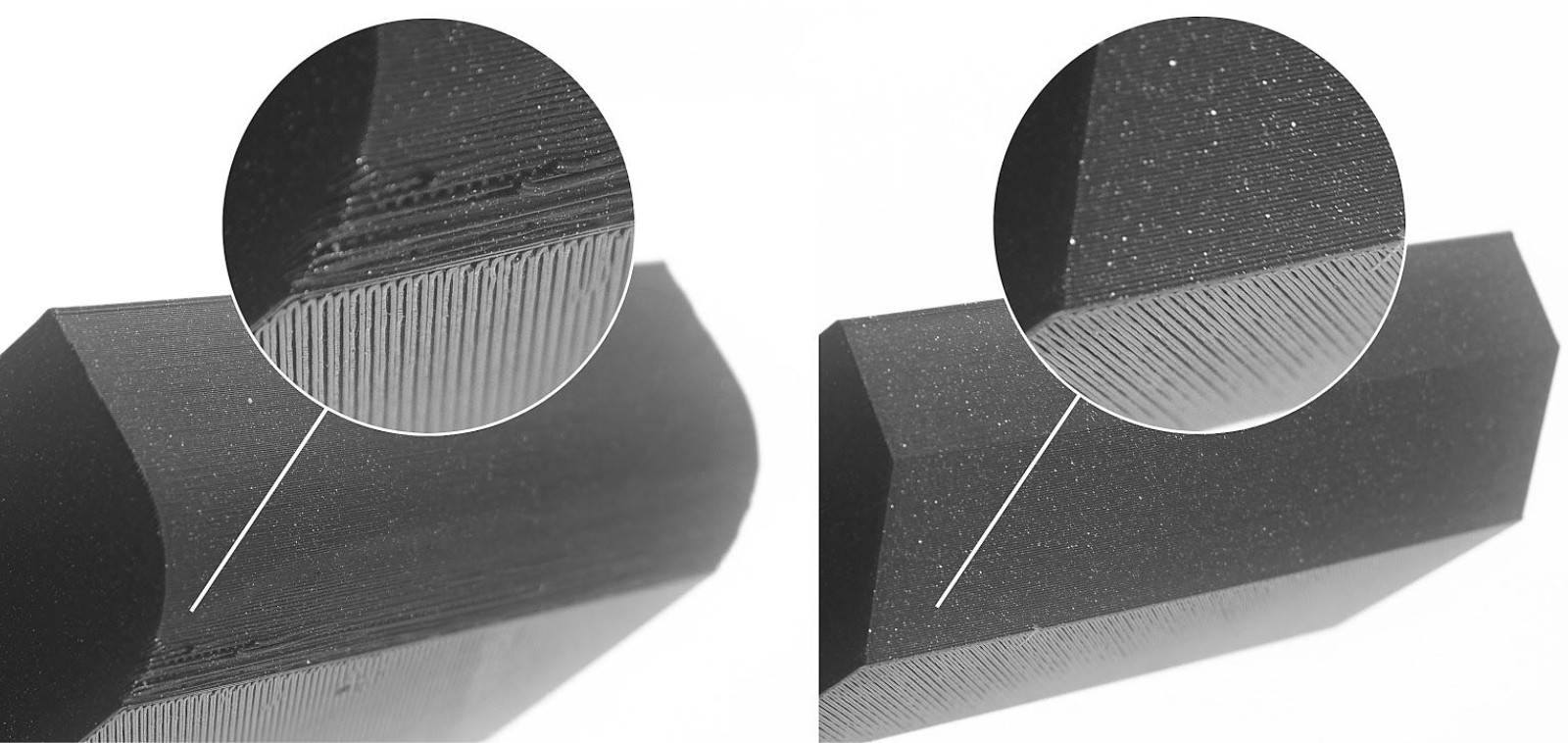
                  Using a chamfer on the edges of two parts that slot together can save you a lot of effort when assembling.

                  How many sides does your cylinder/circle have?

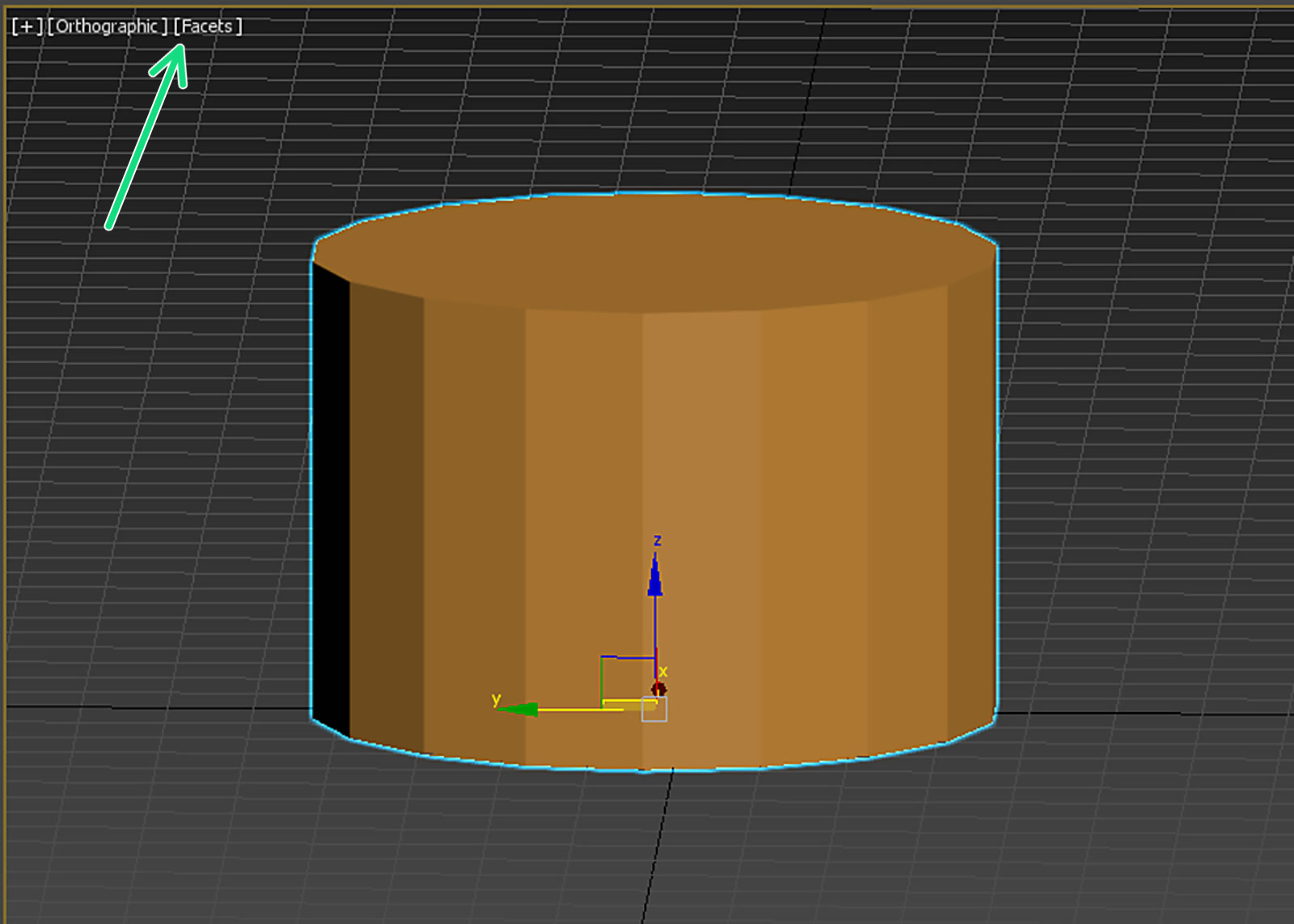
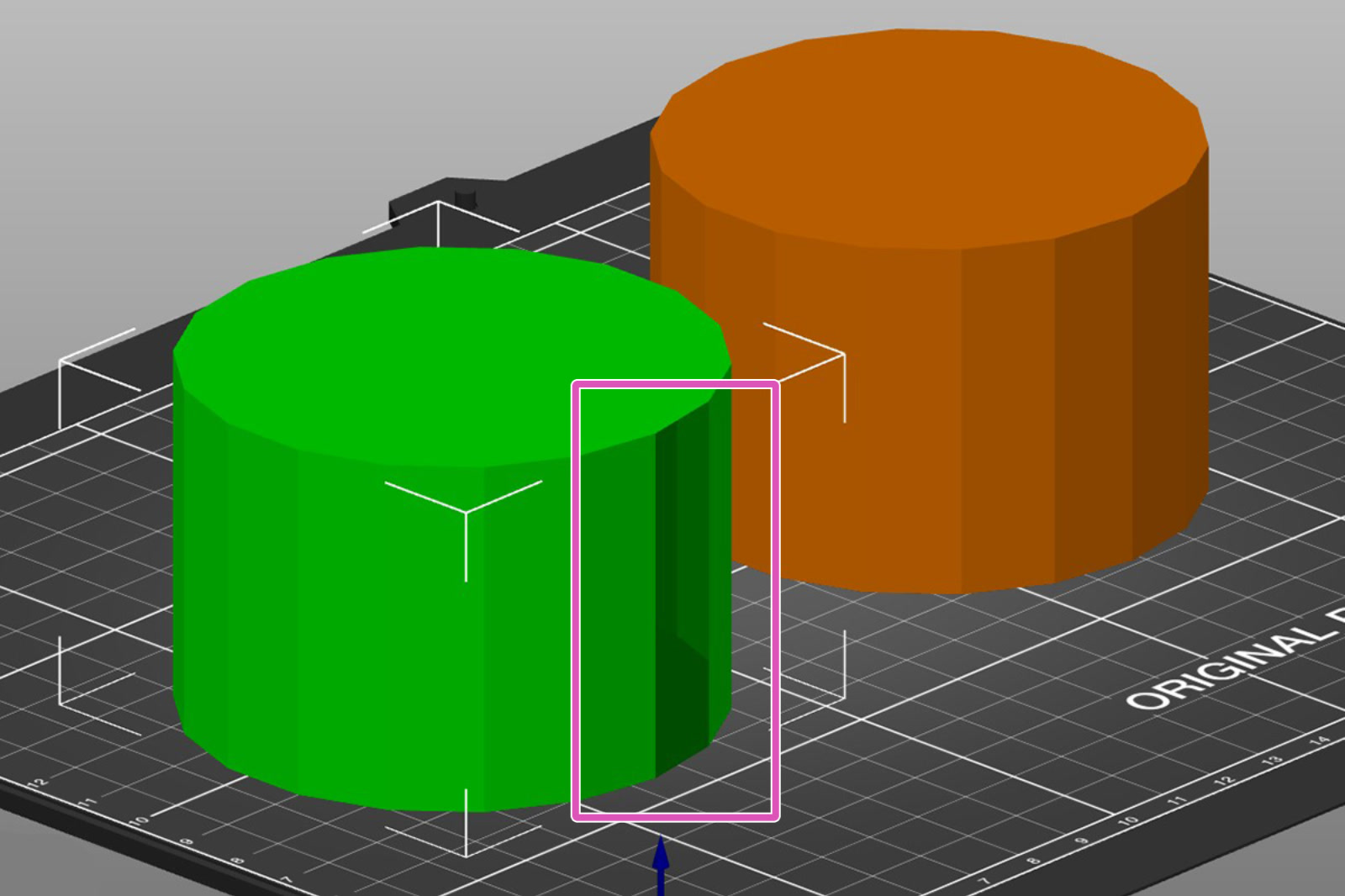
                  Bear in mind that the modeling software you are using might be showing you a curve, but pay attention to the number of sides that are actually present. When the model is being designed, the visual representation can be smoothed out by the software's shaders, and the print can turn out to be a polygon, not a circle. Make sure you have the correct number of sides/faces on your model.
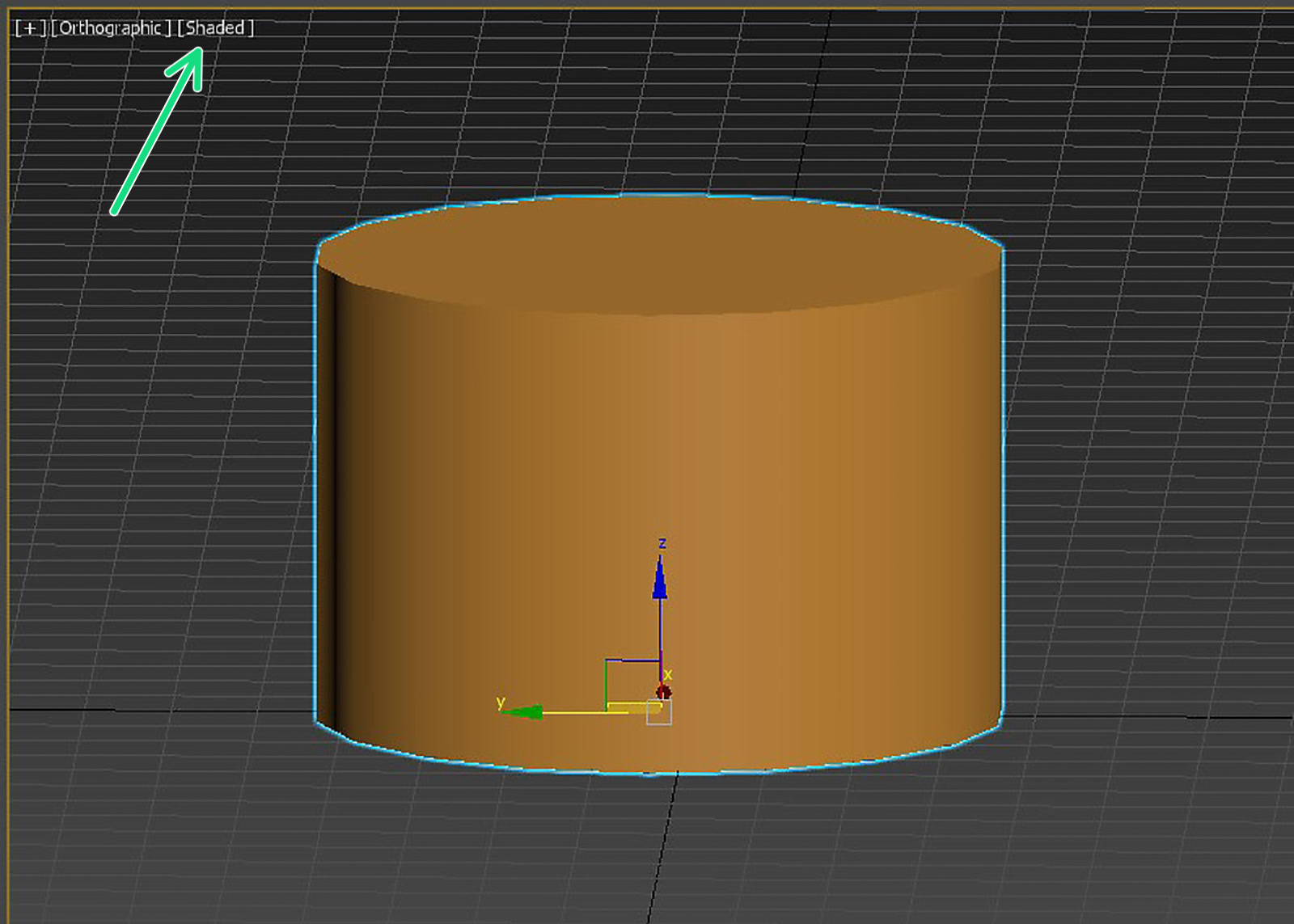
                  Notice how the look of the part changes when changing the shader (green arrow). Both pictures are of the exact same geometry. The right picture shows how it will look printed.

                  Thin walls and minimum feature size

                  Another limitation is the nozzle diameter. The most common size and stock nozzle size on MK3S is 0.4 mm, which in PrusaSlicer has​ an extrusion width of 0.45 mm​. PrusaSlicer can improve upon this in multiple ways. However, it may be wise to keep these numbers in mind, especially when you’re designing thin walls or tiny features. Walls thinner than one nozzle perimeter are not printable.

                  0.4 mm nozzleWall thickness
                  1 perimeter0.45 mm*
                  2 perimeters0.9 mm*
                  3 perimeters1.35 mm*
                  4 perimeters1.8 mm*

                  *These are approximations and may vary depending on the slicer settings.

                  As a way of improving the perimeters, you can go to the PrusaSlicer to the Print Settings tab - Layers and perimeters, and check the option "Detect thin walls". This will merge two paths into a single-pass extrusion. However, walls thinner than one perimeter can not be "repaired" this way.

                  Wall thicknessIs it printable?
                  Less than one perimeter
                  One perimeter
                  More than one perimeter, but less than two perimeters
                  More than two perimeters

                  Tolerances

                  When modeling parts that should fit together, you need to include a certain amount of tolerance. You will probably not be able to slot together two parts with zero-tolerance dimensions. You may have to tweak the tolerances until you reach an optimal result. There’s no single “universal” value - it all depends on different factors, the most common of which are:

                  • Size of the model
                  • Horizontal or vertical orientation
                  • The geometry of the parts that should interlock
                  • Calibration
                  • Settings
                  • Properties of the material

                  An Original Prusa will be accurate to at least 0.2 mm, but you also need to remember that different materials can warp or shrink during printing. Consider if two parts should move, like a hinge, or lock/snap together with a friction fit. An initial good measurement for movable parts is at least 0.3 mm.

                  The PrusaSlicer feature 'Elephant foot compensation' can improve the tolerances of some areas. You can read more about it here: Elephant foot compensation

                  Fine details and material consideration

                  If you have specific conditions for your design, like being outdoors or in a hot environment, this affects your material choice, which in turn can affect your design decisions. In short, filament properties should be taken into consideration. For example, in order to make designs/models that will need to be outdoors or have high mechanical resistance, those should be printed from PC, ASA, PETG, or similar. Those filaments may not print small details as well as PLA. So when modeling a piece that is meant to endure outdoor weather conditions or mechanical strain, you may want to avoid using small details.

                  Iterations of your design

                  You will have to make test prints before you can consider it final. While developing your design, prepare to make tweaks and adjustments to your tolerances and geometry. Having a parametric approach in CAD helps immensely, but if you are just starting out, try not to set your design in stone and save versions along the way, before you, for example, merge multiple objects together and/or create holes/cavities that should fit something else (subtractions).

                  Orientation on the print bed

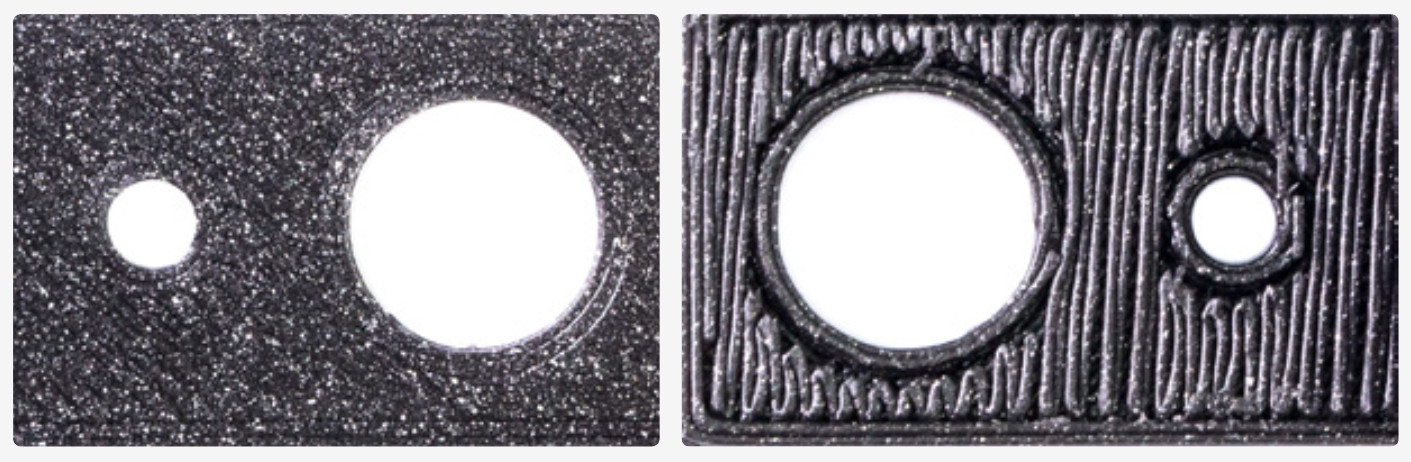
                  A surface printed directly on the print bed is perfectly flat and smooth, while a surface printed above supports will look more inconsistent and rough. The picture shows the worst-case scenario for demonstration purposes. There are ways to mitigate this, but surfaces with a lower overhang angle look much better even with supports.
                  Like wood, FFF prints are stronger in one direction than another. Therefore, you want structural parts to be printed in an orientation that optimizes their structural integrity. 

                  Make sure it is manifold/solid

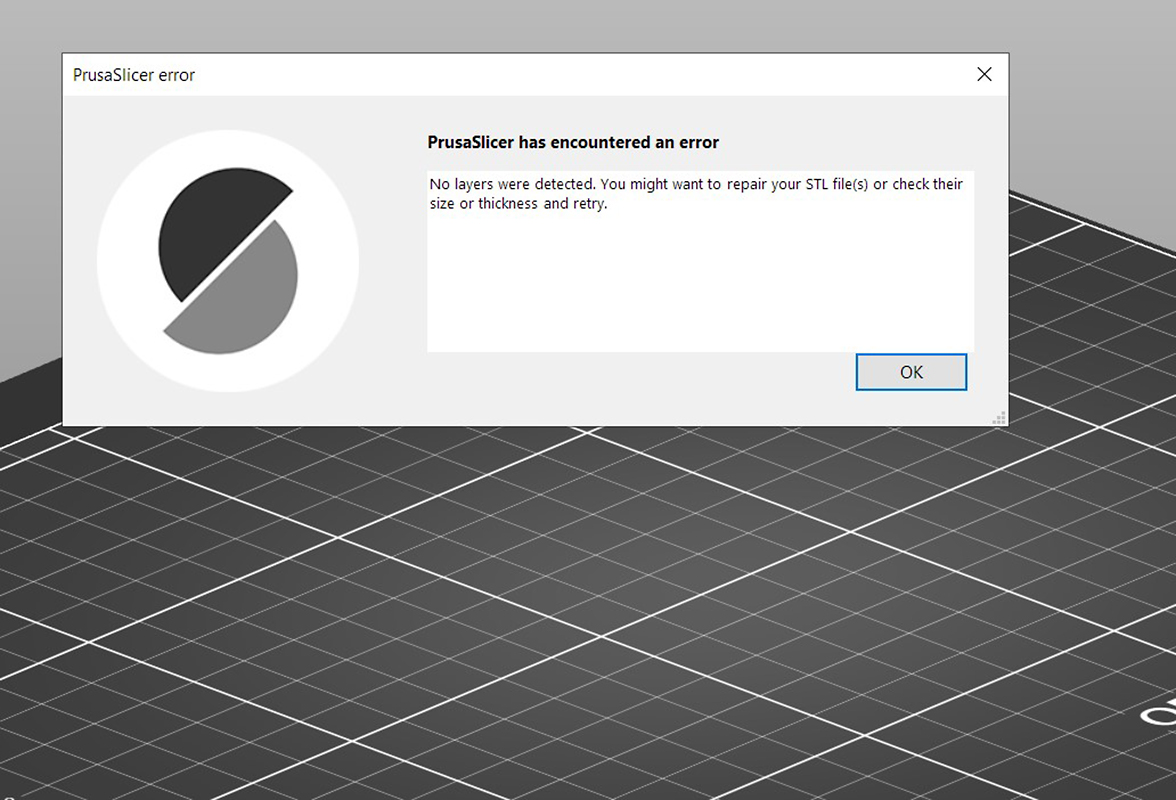
                  The model to be printed must be solid or have "manifold geometry". This is a geometry that can exist in the 3-dimensional real world. If a model has holes on the surface or internal geometry, the part will not be able to be sliced.
                  Most design programs have a feature dedicated to correcting this error under different terms like "make manifold" or "Cap holes". These options will most often delete excess faces, edges, and vertices, and fix or create surfaces where they are missing. You can also see our guide about Corrupted 3D models for printing.

                  Multi-material printing and dual extruders

                  In order for a model to be printed using a printer that supports multi-material printing, such as our MMU3 or our XL in the multi-tool version, several methods for its modeling can be used. 

                  That can be done by having each mesh in a separate 3D file (stl, obj). You can also have multiple meshes in an amf or 3mf file. PrusaSlicer will assign each different mesh to a different color. If you have each mesh in a different file, you will need to import all of them at the same time. We mentioned earlier, making a model manifold or solid. In this case, you will need each part of the whole to be manifold/solid.

                  It is possible to have one single mesh and split it using Meshmixer, but it can be a very long and tedious process. Therefore, this might be helpful to keep in mind during the design process. 

                  More recent methods include Multi material painting, as well as the use of Modifiers combined with tool reassigning for the modifier. 

                  Using PrusaSlicer for certain elements

                  Check how to start using PrusaSlicer.

                  As we touched upon in the part regarding the orientation of the print, a lot can be done in PrusaSlicer after the modeling process is done in your modeling/CAD software. Some operations may be quicker to just do in your slicer than editing your model for them to export it again, or if you don't have access to the original project files.

                  You can use the PrusaSlicer for small modifications in the model. You can use modifier meshes to make patterns on the model. You can also add or remove parts of the geometry.

                  Was this article helpful?
                  This action is available only to registered users. Please log-in.

                  1 comment

                  Log in  to post a comment
                  The Researcher
                  •
                  Great write-up on tolerance considerations and wall thickness. Designing for FDM usually forces a lot of design compromises early on, especially when transitioning prototypes into scalable manufacturing. We’ve been tracking how rapid prototyping across various medical and industrial sectors is shifting toward production-grade end-use parts. For anyone interested in how these design-level decisions scale across the broader industry, we recently mapped out the macro trends and forecasts in our 3D Printing Market Analysis. Appreciate the clear rules of thumb on chamfer vs. fillet overhangs!

                  reference: https://www.rootsanalysis.com/3d-printing-market
                  Reply

                  Topics

                  • Using the printer
                    • 3D models
                      • Creating your own 3D models
                      • Modeling with 3D printing in mind
                    • Material guide
                    • Slicing
                    • Printer maintenance
                    • Prusa Connect & PrusaLink