


The Original Prusa XL/+ is equipped with a color LCD screen that, among other things, supports G-code thumbnails and QR codes.
For the versions of the XL printer with a single tool head, go to LCD menu (XL/+ Single Tool).
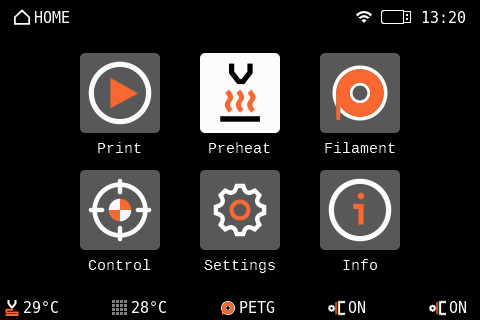
The footer of the main screen can be edited to show the features you wish to be shown on the main page.
If you have a Dual Toolhead printer, only two tools will appear in the menu shown below.
Make sure to always have the latest latest firmware.
Menu structure
- Preheat
-
- PLA
- PETG
- ASA
- PC
- PVB
- ABS
- HIPS
- PP
- FLEX
- PA
- Custom
-
- Name
- Nozzle temperature
- Nozzle Preheat Temperature
- Bed Temperature
- Is Abrasive
- Requires Filtration
- Confirm
-
- Show All
- Cooldown
-
- Filament
-
- Load filament
- Unload filament
- Change filament
- Purge filament
- Change Filament in All Tools
-
- Tool 1 Filament
- Tool 2 Filament
- Tool 3 Filament
- Tool 4 Filament
- Tool 5 Filament
- Carry Out the Changes
-
- Manage Filaments
-
- Loaded filaments
- Edit Filaments
- Reorder Filaments
- Enable Filaments
-
-
- Control
-
- Pick/Park Tool
-
- Park Current Tool
- Pick Tool 1
- Pick Tool 2
- Pick Tool 3
- Pick Tool 4
- Pick Tool 5
-
- Move axis
-
- Move X
- Move Y
- Move Z
- Move E
- Cooldown
-
- Temperature
-
- Nozzle 1 temperature
- Nozzle 2 temperature
- Nozzle 3 temperature
- Nozzle 4 temperature
- Nozzle 5 temperature
- Heatbed temperature
- Print fan speed
- Cooldown
-
- Autohome
- Set ready
- Disable motors
- Enclosure
- Cold Pull
- Calibrations & Tests
-
- 1 Fan Test
- 2 Y Axis Test
- 3 X Axis Test
- 4 Z Alignment Calibration
- 5 Dock Position Calibration
- 6 Loadcell Test
- 7 Z Axis Test
- 8 Nozzle Heaters Test
- 9 Filament Sensor Calibration
- 10 Tool Offset Calibration
- 11 Bed Heater Test
- 12 Phase Stepping Calibration
-
- Pick/Park Tool
-
- Settings
-
- Filament Sensors
-
- Filament Sensing
- Side Filament Sensor 1
- Side Filament Sensor 2
- Side Filament Sensor 3
- Side Filament Sensor 4
- Side Filament Sensor 5
- Toolhead Filament Sensor 1
- Toolhead Filament Sensor 2
- Toolhead Filament Sensor 3
- Toolhead Filament Sensor 4
- Toolhead Filament Sensor 5
- Restore Defaults
-
- Stuck Filament Detection
- Stealth Mode
- Fan check
- Verify Gcode
- Crash Detection
- Tools
-
- Tool 1
-
- Nozzle Diameter
- What nozzle diameter do I have?
- Nozzle Hardened
- Nozzle High-flow
- Pick/Park Tool
- Print Fan Type
- Calibrate Filament Sensor
-
- Tool 2
- Tool 3
- Tool 4
- Tool 5
- Park Current Tool
- Tool 1
-
- Input Shaper
-
- Calibration
- X-axis filter
- X-axis frequency
- Y-axis filter
- Y-axis frequency
- Restore Defaults
-
- User Interface
-
- Footer
-
- Item 1 [None/Nozzle/Bed/Filament/FSensor/Speed/X/Y/Z/Z Height/Print fan/Heatbreak fan/Heatbreak/Current tool/All nozzles/FSensor side/Nozzle diameter/Nozzle PMW/Enclosure temperature]
- Item 2
- Item 3
- Item 4
- Item 5
-
- Sort Files [Time/Name]
- Print Progress Screen [OFF, 30 s - 200 s]
- Menu Timeout
- Sound Mode [Loud/Silent/Assist/Once]
- For filament change, preheat [Nozzle/Noz&Bed]
- RGB Status Bar
- RGB Side Strip
- RGB Side Strip Dimming
- Tool Light
- Touch
- Touch Sig Workaround
- Footer
-
- Language & Time
-
- Language
-
- English
- Čeština
- Deutsch
- Español
- Français
- Italiano
- Polski
- ニホンゴ
-
- Time Zone Hour Offset
- Time Zone Minute Offset
- Time Zone Summertime
- Time Format
- Language
-
- Network
-
- Active Interface [Eth/Wi-fi]
- Network status
-
- IPv4 Address
- IPv4 Gateway
- MAC Address
- Hostname
- DNS Server
- Ping | Loss
- Gateway
- DNS server
-
- Wi-Fi
-
- Wi-Fi status
- SSID
- Wi-Fi Wizard
- Protocol
- LAN
- IPv4 Address
- IPv4 Netmask
- IPv4 Gateway
- Hostname
- MAC Address
-
- Ethernet
-
- Protocol
- LAN
- IPv4 Address
- IPv4 Netmask
- IPv4 Gateway
- Hostname
- MAC Address
-
- Prusa Connect
-
- Enabled
- Status
- Error
- Hostname
- Add printer to Connect
- Load Settings
-
- Prusa Link
-
- Enabled
- User
- Password
- IPv4 address
- Hostname
- Generate Password
-
- Metrics & Log
-
- What is this?
- Allow
- Enable Stored on Startup
- Stored configuration
- Host
- Metrics port
- Log Port
- Current configuration
- Metrics Host
- Metrics Port
- Log Host
- Log Port
-
-
- Hardware
-
- Tools
- Side FSensor Remap
- Filament Autoloading
- Phase Stepping
- Crash Sensitivity XY [Medium/High/Low]
- Heat Entire Bed
- G-code checks
-
- Nozzle Diameter [Warn/Strict/None]
- Printer Model [Warn/Strict/None]
- Firmware Version [Warn/Strict/None]
- G-code Level [Warn/Strict/None]
-
- Display Refresh Speed [High/Low]
-
- FW update
- System
-
- Save Crash Dump
- Save Logs To File
- Device Hash in QR
- Load Settings from File
- Factory Reset
-
- Reset Settings & Calibrations
- Hard Reset (USB with FW needed)
-
-
- Filament Sensors
-
- Info
-
- Network Status
-
- Wi-Fi Status
- IPv4 Address
- IPv4 Gateway
- MAC Address
- Hostname
- DNS Server
- Connect Host
- Connect IP
- Ping | Loss
- Connect
- Gateway
- DNS Server
-
- Sensor Info
-
- Heatbreak 1Temp
- Heatbreak 2 Temp
- Heatbreak 3 Temp
- Heatbreak 4 Temp
- Heatbreak 5 Temp
- Board Temperature
- MCU Temperature
- Bed Temperature
- Nozzle 1 Temperature
- Nozzle 2 Temperature
- Nozzle 3 Temperature
- Nozzle 4 Temperature
- Nozzle 5 Temperature
- Dwarf Board Temp
- Dwarf MCU Temp
- MBed MCU Temp
- Loadcell Value
- Tool Filament Sensor
- Side Filament Sensor
- Print Fan
- Heatbreak Fan
- Input Voltage
- 5V Voltage
- Sandwich 5V Current
- XL Buddy 5V Current
-
- Version info
-
- Firmware Version
- Bootloader Version
- Buddy Board
- Serial Number
- xLCD
-
- Print Statistics
-
- Fail Stats
-
- Power Failures
- Last Print Crashes on X Axis
- Last Print Crashes on Y Axis
- Crashes on X Axis
- Crashes on Y Axis
-
- Statistics
-
- X-axis
- Y-axis
- Z -axis
- Filament
- Tool 1
- Tool 2
- Tool 3
- Tool 4
- Tool 5
- Tools changed
- Tool 1
- Tool 2
- Tool 3
- Tool 4
- Tool 5
-
- Print Time
- Fail Stats
-
- Network Status
-
Was this article helpful?
This action is available only to registered users. Please log-in.
1 comment