English
Login

Prusa USS Drybox

Relevant for

XL family
PRO family
ENCLOSURE family
MK4 family
MK3.9 family
+
Article is also available in following languages
English
Čeština
Polski
Deutsch
Français
Español
Italiano
日本語

Some materials are highly hygroscopic, meaning they must be dried before printing and kept in a low-humidity environment throughout the printing process. For this purpose, we offer Prusa USS Drybox – a simple and effective solution for storing and printing with all common and high-performance filaments.

The Prusa USS Drybox is a transparent, sealable polypropylene container compatible with the Prusa Printers (Except MINI/+ and MMU). Its main advantages are simplicity, lightweight design, secure sealing, and the option to mount it directly onto the printer.

Note that the Prusa Drybox is designed to slow moisture absorption by the inserted filament spool, using desiccant silica gel packets. If the filament is already moist, it must be pre-dried in a professional drying oven first. For more detailed information, visit the Drying filament article.

Before you start with unboxing, check our Printables page to see what you can print for your drybox.

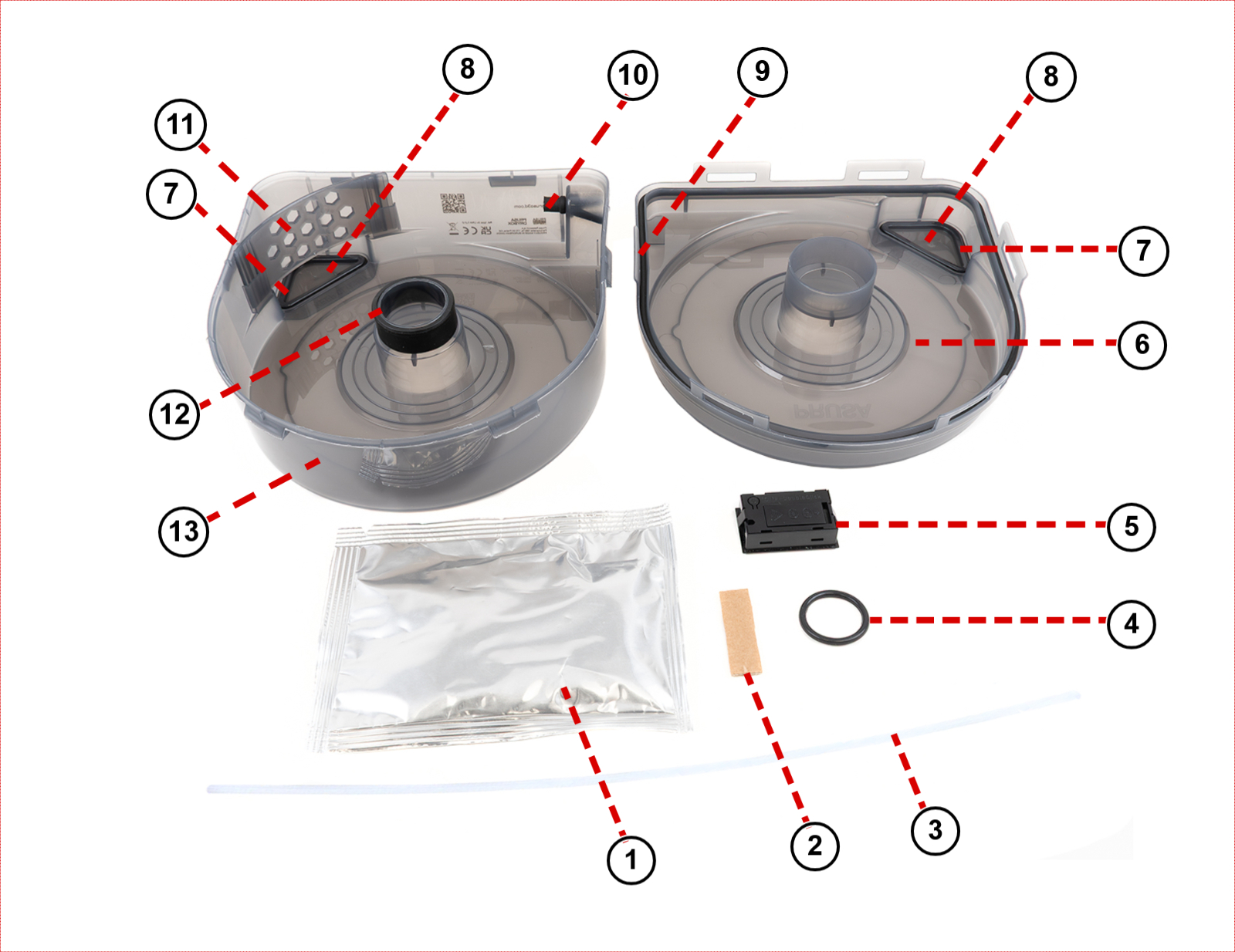
Components

The drybox is made of the parts:

  1. Dessicant in an aluminium sealed pack
  2. Material labels
  3. PTFE tube
  4. O-ring for printed spoolholder
  5. TPM40 hygrometer
  6. Top
  7. O-ring seal for caps
  8. Removable caps
  9. Outer seal (do not remove)
  10. Grommet (do not remove)
  11. Rib (do not remove)
  12. Inside seal (do not remove)
  13. Bottom

First use

Before starting, adjust the PTFE tube length to the size recommended for your printer as recommended below.
  1. Remove the Prusa USS Drybox from its packaging and open it by releasing all latches.
  1. On the box, there is a part with the most commonly used filaments and a few blank ones that can be torn out from the box. Prepare the label you will use first on the drybox. The other labels can be stored for future usage.
  1. Remove the hygrometer from the included box, and remove the battery pull tab (if present). To turn on the hygrometer, press and hold the button located on the rear side until the device powers on. Insert the hygrometer into the slots with its display facing the transparent wall of the Prusa USS Drybox, according to the position in which the drybox will be used.
  1. Remove the silica gel packet from the aluminium packaging and place it behind the plastic grid in the corner of the drybox. Do not use scissors to open the package!
  1. Remove the filament spool from its packaging and place it inside the Prusa USS Drybox. Secure the end of the filament to prevent it from unraveling and tangling. Open the filament grommet, and pass the filament end through the grommet opening. To secure the end of the filament and limit the filament contact with the air, insert it into the grommet cover and close the grommet lid. 

    If you have not installed the filament label, add it now, as we will close the drybox on the next step.

  1.  Close the lid and secure all latches to ensure a tight seal. Make sure the lid is fully closed. It means the gasket must seal evenly, and the clips must snap securely into place. Improper sealing can lead to increased internal humidity. We recommend visually inspecting the seal each time.

  1. Open the grommet lid and take the filament from it. Feed the filament through the PTFE tube and insert the PTFE into the grommet opening. Try to minimize contact between the filament and ambient air.
  1. Connect the other end of the PTFE tube to the printer according to the instructions below.

Printing

The Prusa USS Drybox should be mounted directly on the printer using dedicated holders available on Printables. These holders are specific to various printer models and utilize a puck-and-bayonet system for easy attachment. You can find the parts in Printables.

The filament is guided out of the box through a PTFE tube, which must be trimmed to the appropriate length for your printer model. Always make sure that the tube does not have a lot of slack, or it can go into the drybox and prevent the spool from spinning. When the filament is not in use, seal the filament guide using the included grommet.

The hygrometer is equipped with a multi-function button on the back. Press the button for a long time (approx. 1.5 seconds) to turn the device on or off. Press the button twice to switch between displaying the temperature in °C / °F.

Cutting the PTFE tube

To cut the PTFE tube, we recommend any cutting tool that slices. Avoid using tools that cut or slip, like cutting pliers or scissors, as they will deform the tube. You can use a sharp box cutter or knife. If you are not able to make a straight cut, you can use some guide.

CORE One/+, CORE One L

When installing the drybox on the CORE One, the PTFE tube needs to be cut to 21 cm. If you have a CORE One, follow the instructions to install the removable spoolholder. You will need:

  1. Unlock the spoolholder from the puck, and place the drybox as shown below. Lock the Drybox with the spoolholder.
CORE One/+CORE One L
  1. Add the PTFE Connect to the side filament sensor PTFE and to the drybox PTFE.
  1. Load the filament into the printer.

  1. Lock the two adapters together by twisting them in opposite directions.

Note that, as an alternative installation method, it is also possible to remove the PTFE from the side filament sensor with pliers and an Allen key, load the filament, and insert the drybox PTFE tube directly into the side filament sensor to start printing.

CORE OneCORE One+/CORE One L

MK printers

When installing the drybox on your MK3/S+, MK3.5/S, MK3.9/S, or MK4/S, the PTFE tube must be cut to 50 cm. Before starting the drybox installation, print the adapter, two pucks, and two removable spoolholders. You will need:

  • 2.5 mm Allen key
  • 4x M3x18 screws cylinder head
  • 1x M3x10 screw
  • Hexagonal nut
  1. Prepare two pucks by placing two M3x18 screws on their flat part.
  1. Thread an M3x10 screw until the middle of the nut, and insert it in the middle opening of the adapter.
  1. Join the adapter and the puck as shown below. Use the side of the adapter without the screw.
  1. Unscrew the screw from the nut in the adapter.

  1. Remove the spoolholder and prepare it with the adapter and puck. Screw a puck on the other side of the adapter.
  1. Attach the spoolholder to the frame, place the drybox in the puck, and lock it with the removable spoolholder.
  1. Screw a FESTO fitting to the top of the extruder. Load the filament inside the drybox, and insert the PTFE tube in the fitting.

XL

Each XL toolhead needs to have a different PTFE length and position of the drybox. 

  • Toolhead 1: PTFE 45 cm
  • Toolhead 2: PTFE 35 cm
  • Toolhead 3: PTFE 25 cm
  • Toolhead 4: PTFE 45 cm
  • Toolhead 5: PTFE 35 cm

You will need:

  • M4 Allen key
  • Pliers
  1. Unscrew the spoolholders with an M4 Allen key.
  1. Remove the PTFE tube from the side filament sensor.

  1. Screw a puck to each place where a spoolholder was using the M4x12 screw that was previously holding the XL spoolholder. 

  1. Place the drybox on the puck. We recommend using the positions below for the five positions. Lock it with the removable spoolholder.
  1. Load the filament through the side filament sensor, and insert the drybox PTFE tube in the side sensor case.

HT90

When installing the drybox on the HT90, the PTFE tube needs to be cut to 27 cm. This will also use an adapter between the puck and the printer. Before starting the drybox installation, print the adapter. You will need:

  • 3 mm Allen key
  • 2x M4x8 screws
  • 1x M4x10 screw
  1. Remove the spoolholder by loosening the screw on the center top with a 3 mm Allen key.
  1. Screw the adapter on the HT90 with two M4x8 screws.
  1. On the other side, attach the puck to the adapter with an M4x10 screw.
  1. Place the previously prepared Prusa USS Drybox on the puck, and lock it with the spoolholder.
  1. Press the collet to remove the PTFE from the filament entry. If the clip is holding the collet, make sure to pull it out.
  1. Load the filament. Insert the drybox PTFE tube and pull the collet to lock it, and add the clip.

Managing humidity

The Prusa USS Drybox uses silica gel to maintain low internal humidity. You can monitor the humidity level using the built-in digital hygrometer or an optional indicator card (purchased separately). There are small covers on both sides of the Prusa USS Drybox. These allow you to manually rotate the spool without opening the lid. This significantly minimizes moisture ingress compared to opening the entire box.

Upon closing the Prusa USS Drybox, verify the humidity level on the hygrometer. Note that the humidity value may take some time to decrease and stabilize (up to 1 hour). If the relative humidity (RH) exceeds the maximum recommended value for the material, replace or regenerate the desiccant.

If you wish to use your own dessicant, you can print a storage box for it from Printables.

Filament type Maximum recommended RH (%) (measured on the hygrometer)
PLABelow 30% RH (short-term tolerance up to 40%)
ABSBelow 30% RH (ideally below 15%)
ASABelow 30% RH (ideally below 10%)
PETGBelow 20% RH
TPUBelow 20% RH (ideally <15%)
PVABelow 20% RH
PCBelow 20% RH
BVOHBelow 20% RH
You can use the cardboard label slot on the front of the drybox to identify the stored material (e.g., “PA11-CF”, “ASA”), or get the model from Printables.

TPM40 hygrometer

The Prusa USS Drubox includes the TPM40 hygrometer to measure the humidity inside the box.

The back of the hygrometer has an On/Off button. Press it for 1.5 seconds to power the hygrometer on or off. Press it twice to switch between temperature units (°C / °F).

Specifications

  • Dimensions: 48 × 28 × 15 mm
  • Weight: 43 g
  • Power supply: 2 × LR44 button cell batteries (1.5 V)
  • Temperature range: -50 °C to +70 °C (Accuracy: ±1 °C, Resolution: 0.1 °C)
    If the measured temperature exceeds +70 °C, the display shows “HHH”. If the temperature falls below -50 °C, the display shows “LLL”.
  • Humidity Measurement range: 10% RH to 99% RH (Accuracy: ±3% RH, Resolution: 1% RH). If the actual humidity is outside the measurable range (below 10% RH or above 99% RH), no special warning is displayed. Instead, the last valid reading remains on the screen (10% if below range, 99% if above range).
  • Battery life (device off): Approximately 2 years

Battery Installation

  1. Open the battery cover on the back of the device.
  2. Insert two LR44 batteries, ensuring correct polarity.
  3. The display will automatically activate after insertion.
  4. Remove the batteries if the device will not be used for an extended period.

Maintenance

The drybox does not need to be cleaned regularly during normal use. Other than replacing the dessicant as mentioned above, other maintenance steps are:

  • Do not use the grommet without the PTFE tube, as it might be damaged by the filament.
  • Cleaning dust from the box with low-pressure compressed air.
  • Always inspect the gasket and lid fit before closing the drybox.
  • Do not use a damaged or cracked drybox.
  • If you will not be using the device for an extended period, remove the batteries.
  • Do not expose any of the components to direct sunlight or extreme humidity.
  • If the hygrometer display does not show any values, replace the batteries by opening the battery cover on the back of the device (2× LR44 (1.5 V)). Remove the batteries if you will not be using the device for a long period of time.
Was this article helpful?
This action is available only to registered users. Please log-in.